If you're referencing posts on this site on your website/forums etc, please make some effort to quote relevant parts of the post rather than copying the entire text verbatim onto your site.
I've seen the entire body of the previous post quoted in its entirety on a couple of forums, including the line "Please reply to this post with your opinions on what I should work on next." Visitors to those sites are getting confused and posting their suggestions on the external forum, rather than on this blog. Unfortunately it's very unlikely that I'll read or be able to respond to people's comments on other sites.
Thanks!
StrmnNrmn
Thursday, February 22, 2007


Plans for R10
Now that R9 is finally available, I'm ready to start making plans for R10. Firstly, I really don't want to leave it so long between releases again. The longer I leave between releases, the more hype builds up, and the harder it is to meet people's expectations. I prefer the idea of doing fairly frequent, incremental releases rather than relasing versions with huge sets of changes periodically.
So I'm currently planning to release R10 sometime around the end of March. The question is, what should I focus on?
The areas which clearly need lots of work are speed and compatibility. Unfortunately it's a bit of a chicken-and-egg situation - if the emulator runs slowly, it doesn't matter if certains roms don't run, because they'd still be unplayable. On the other hand, there's no point in having an ultra-fast emulator if it doesn't run the games people want to play. As I see it, I have to keep working on both of these things - in the long term, it doesn't make sense to concentrate on one and not the other.
I think the best approach is to alternate on work between the two areas. R9 saw significant speed improvements, but almost no progress with compatibility, so I'm currently leaning towards trying to get a few of the more popular titles running. But you're the ones who are going to be using the emulator, so I want to hear your views on what I should work on next.
Please reply to this post with your opinions on what I should work on next. Have a good play with R9 to see what's changed - maybe some things are working better than you expected. Maybe some things are no longer working? Here are a few suggestions:
-StrmnNrmn
So I'm currently planning to release R10 sometime around the end of March. The question is, what should I focus on?
The areas which clearly need lots of work are speed and compatibility. Unfortunately it's a bit of a chicken-and-egg situation - if the emulator runs slowly, it doesn't matter if certains roms don't run, because they'd still be unplayable. On the other hand, there's no point in having an ultra-fast emulator if it doesn't run the games people want to play. As I see it, I have to keep working on both of these things - in the long term, it doesn't make sense to concentrate on one and not the other.
I think the best approach is to alternate on work between the two areas. R9 saw significant speed improvements, but almost no progress with compatibility, so I'm currently leaning towards trying to get a few of the more popular titles running. But you're the ones who are going to be using the emulator, so I want to hear your views on what I should work on next.
Please reply to this post with your opinions on what I should work on next. Have a good play with R9 to see what's changed - maybe some things are working better than you expected. Maybe some things are no longer working? Here are a few suggestions:
- Speed. Make it faster generally? Is there a specific game that runs slowly which you'd like to see an improvement with?
- Compatibility. Should I work on FlashRAM support? Is there a specific game that doesn't boot, or crashes the emulator? Does your favourite game boot, but then crash when you try to start playing?
- Audio. The audio support is quite new. Are there certain games where it doesn't work? Should I try to improve the audio so it's less choppy?
- Graphics. Maybe your favourite game runs, but there are significant graphical glitches?
- Save Games. Save game support is currently 'in' for EEPROM and MemPak based saves, but very flaky. Should I work on improving this so you don't lose your hard-earned progress?
- Savestate. Would it be better for me to implement savestate support, so you can save an resume a game at any point?
-StrmnNrmn
Daedalus R9 - Rejoice!
I've been working hard making the last few changes for Daedalus R9, and I'm pleased to say that it's now ready for download:
Daedalus PSP R9 for v1.00 Firmware
Daedalus PSP R9 for v1.50+ Firmware
Daedalus PSP R9 Extras (a few preview pictures for the UI etc)
Daedalus PSP R9 Source
I've talked a bit about what's in this release, so I'll not repeat everything here. Here's a summary though:
* Faster
* New UI
* Audio
* Various graphical fixes
Please note - as audio support is very much 'beta' at the moment, it's disabled by default. You can enable the setting either in the front-end, or from the pause menu.
Please also note: To keep the distribution size down, I've not included any 'preview' pictures for the rom selector alongside the emulator. You can download and extract the 'Extras' file above for a few sample previews. It should be easy enough for people to create their own preview pictures - see the readme.txt for more details.
That's about it for now. Please post comments with any immediate feedback. I'm going to be a bit busy for a few days (and then I'm off skiing on Sunday for a week), but I'll try to reply to as many questions as I can in the meantime. I'll also try to get the ball rolling with my initial thoughts on stuff I want to do for R10.
[Edit 1:07AM - You may need to wait a few minutes for sourceforge's mirrors to synchronise. Sorry :) ]
Enjoy,
-StrmnNrmn
Daedalus PSP R9 for v1.00 Firmware
Daedalus PSP R9 for v1.50+ Firmware
Daedalus PSP R9 Extras (a few preview pictures for the UI etc)
Daedalus PSP R9 Source
I've talked a bit about what's in this release, so I'll not repeat everything here. Here's a summary though:
* Faster
* New UI
* Audio
* Various graphical fixes
Please note - as audio support is very much 'beta' at the moment, it's disabled by default. You can enable the setting either in the front-end, or from the pause menu.
Please also note: To keep the distribution size down, I've not included any 'preview' pictures for the rom selector alongside the emulator. You can download and extract the 'Extras' file above for a few sample previews. It should be easy enough for people to create their own preview pictures - see the readme.txt for more details.
That's about it for now. Please post comments with any immediate feedback. I'm going to be a bit busy for a few days (and then I'm off skiing on Sunday for a week), but I'll try to reply to as many questions as I can in the meantime. I'll also try to get the ball rolling with my initial thoughts on stuff I want to do for R10.
[Edit 1:07AM - You may need to wait a few minutes for sourceforge's mirrors to synchronise. Sorry :) ]
Enjoy,
-StrmnNrmn
Sunday, February 18, 2007
R9 Status Update
It's been a couple of days since my last post, so I wanted to give a quick update on what's left on my R9 TODO list.
-StrmnNrmn
- I've been working over the weekend at fixing a number of outstanding graphical glitches, putting in place a system to automatically translate n64 blend modes to the psp. This should hopefully nearly eradicate nearly all of the purple and black textures that have shown up all over the place in previous releases. This is quite an interesting feature from a technical point of view, so I'll talk about this in a bit more depth once R9 is out.
- I have a few glitches in the new UI to fix (e.g. audio can't be disabled once the rom has started, controller can't be remapped once the rom has started).
- I need to hook up a few things to the new UI (e.g. 'reset to main menu', 'take screenshot' etc)
-StrmnNrmn
Wednesday, February 14, 2007
Audio Support in Daedalus R9
Last week I said that I'd talk a bit about the audio support I've been working on. I want to describe how it was implemented, and continue with what to expect from it in R9 and how it affects performance.
I'd been putting off implementing audio support for a number of reasons. Firstly, I just didn't think that the emulator was running fast enough to spare any extra time doing other work. Secondly, because it wasn't running fast enough, I knew the resulting audio would sound horrible and choppy. Finally, I knew that writing an audio list processor from scratch was going to be very time consuming and error prone.
Maybe it's worth going into a little more detail about that last point.
Most audio and graphics processing on the N64 is handled through audio lists and display lists (very similar to an OpenGL display list). These lists are sequences of simple instructions which are usually constructed by the CPU as the game is running. I used the word 'usually', because it's possible to generate the lists offline, and just execute them at runtime as required.
One way of thinking about the audio and display lists is as a very simple scripting language. Each instruction in the list performs a trivial operation, like copying a block of sample data to another region of memory, interpolating samples from two buffers and storing the result in another and so on. The format of the instructions in the lists has been very carefully designed so that they can be efficiently operated on by the N64's coprocessor, the RSP. The RSP is a very fast processor with SIMD instructions (i.e. instructions which operate on multiple pieces of data - much like SSE on x86 based processors), and it's ideally suited to performing the kind of jobs required in processing audio data or transforming and lighting geometry. The code which executes on the RSP is often called 'microcode'.
The nice thing about audio and display lists is that they can be executed asynchronously by the RSP while the CPU is off doing other work. The CPU just needs to copy a small block of data (describing the task at hand) to the RSP's local memory, and then kick it off. The CPU then goes off doing some other work (updating the game logic for instance.) At some point, the RSP finishes processing the audio or display list, and signals the CPU that it's finished its work through an interrupt. The CPU can then queue up the next available job to the RSP for processing.
There are two ways in which an emulator can handle audio or display lists. The first method is to emulate the RSP at a very low level. This means emulating the RSP as a separate processor, emulating the microcode which has been written to decode and process the audio and display lists. This is what's known as LLE (low-level emulation). The other approach is HLE (high-level emulation). This involves interpreting and processing the audio and display lists manually, ignoring the emulation of the RSP and the microcode entirely.
The HLE approach is typically much, much faster than emulating the task at a low level. This speed comes as a price though, as rather than 'just' writing code to emulate the RSP core, a separate implementation must be written for every task that you want to emulate. This would be fairly simple if there was a single format for audio lists, and a single format for display lists. Unfortunately though, over the years Nintendo released a number of different versions of the microcode controlling these tasks, and many of these changes resulted in different formats for the audio lists and display lists.
Last time I checked, there were 3 major audio list formats, and 5 (6?) major display list formats. Some features of the list formats are similar between versions, but typically they're all very different, and large portions must be reverse engineered from scratch.
So, back to audio support in Daedalus. I had come to the point with implementing various dynarec improvements that I felt it was worth looking into audio to get an idea how how well it would work, and how much of a performance hit there was. As I was saying, one of the reasons I'd been putting off implementing audio support was that I knew that taking a high-level approach was going to be time consuming and error prone. The alternative, low level emulation, just wasn't practical from a performance point of view.
In the end, I decided to see if I could find the source for a PC audio plugin, and adapt this for use with Daedalus. I was fortunate enough to discover that Azimer had made the source for v0.55 of his audio plugin available (Azimer - if you're reading this, please drop me a line to say hello :) My reasoning was that if I could get something up and running in a couple of evenings then I could figure out how much work would be involved in getting it polished. If it looked like it was going to be too much work then I could revert all my changes and at most I'd have wasted just a few hours.
In the end it all went incredibly well. Azimer's source was very self-contained, with just a couple of hooks to implement to get it working. There were a few small issues to solve like having to upsample the output to 44.1KHz (as the PSP output is fixed at this frequency), but nothing that took more than a couple of hours.
So, how does it sound? Well, it's pretty variable. It sounds great in places where there's a high enough framerate to keep the audio buffer full. Mario 64 is pretty good for this - it seems 25fps is a minimum to avoid any choppiness in the output. When the framerate drops lower than this the audio quality does start to suffer significantly. On the plus side, it seems to be decoding everything correctly in all the roms I've tested so for, which means that the quality is only going to improve as I make further improvements to the performance of the emulator.
Which brings me to my next point - how does enabling audio support affect the performance of the emulator? I've not had chance to measure this empirically, but it probably slows things down by about 10-20%. Given that R9 is running about 40-100% faster than R8, you should be able to run R9 with audio and still see a small speedup. In any case, I've added an option to enable or disable the audio in the front-end (this is also accessible from the pause menu while the rom is running).
So, that's just about the story so far with audio support in Daedalus. There's clearly a lot more work to do, but the good news is that audio support is in, and working, and is only going to improve with time. Later this week I'll talk a bit about future improvements, including methods for reducing the impact that audio processing has on performance.
-StrmnNrmn
I'd been putting off implementing audio support for a number of reasons. Firstly, I just didn't think that the emulator was running fast enough to spare any extra time doing other work. Secondly, because it wasn't running fast enough, I knew the resulting audio would sound horrible and choppy. Finally, I knew that writing an audio list processor from scratch was going to be very time consuming and error prone.
Maybe it's worth going into a little more detail about that last point.
Most audio and graphics processing on the N64 is handled through audio lists and display lists (very similar to an OpenGL display list). These lists are sequences of simple instructions which are usually constructed by the CPU as the game is running. I used the word 'usually', because it's possible to generate the lists offline, and just execute them at runtime as required.
One way of thinking about the audio and display lists is as a very simple scripting language. Each instruction in the list performs a trivial operation, like copying a block of sample data to another region of memory, interpolating samples from two buffers and storing the result in another and so on. The format of the instructions in the lists has been very carefully designed so that they can be efficiently operated on by the N64's coprocessor, the RSP. The RSP is a very fast processor with SIMD instructions (i.e. instructions which operate on multiple pieces of data - much like SSE on x86 based processors), and it's ideally suited to performing the kind of jobs required in processing audio data or transforming and lighting geometry. The code which executes on the RSP is often called 'microcode'.
The nice thing about audio and display lists is that they can be executed asynchronously by the RSP while the CPU is off doing other work. The CPU just needs to copy a small block of data (describing the task at hand) to the RSP's local memory, and then kick it off. The CPU then goes off doing some other work (updating the game logic for instance.) At some point, the RSP finishes processing the audio or display list, and signals the CPU that it's finished its work through an interrupt. The CPU can then queue up the next available job to the RSP for processing.
There are two ways in which an emulator can handle audio or display lists. The first method is to emulate the RSP at a very low level. This means emulating the RSP as a separate processor, emulating the microcode which has been written to decode and process the audio and display lists. This is what's known as LLE (low-level emulation). The other approach is HLE (high-level emulation). This involves interpreting and processing the audio and display lists manually, ignoring the emulation of the RSP and the microcode entirely.
The HLE approach is typically much, much faster than emulating the task at a low level. This speed comes as a price though, as rather than 'just' writing code to emulate the RSP core, a separate implementation must be written for every task that you want to emulate. This would be fairly simple if there was a single format for audio lists, and a single format for display lists. Unfortunately though, over the years Nintendo released a number of different versions of the microcode controlling these tasks, and many of these changes resulted in different formats for the audio lists and display lists.
Last time I checked, there were 3 major audio list formats, and 5 (6?) major display list formats. Some features of the list formats are similar between versions, but typically they're all very different, and large portions must be reverse engineered from scratch.
So, back to audio support in Daedalus. I had come to the point with implementing various dynarec improvements that I felt it was worth looking into audio to get an idea how how well it would work, and how much of a performance hit there was. As I was saying, one of the reasons I'd been putting off implementing audio support was that I knew that taking a high-level approach was going to be time consuming and error prone. The alternative, low level emulation, just wasn't practical from a performance point of view.
In the end, I decided to see if I could find the source for a PC audio plugin, and adapt this for use with Daedalus. I was fortunate enough to discover that Azimer had made the source for v0.55 of his audio plugin available (Azimer - if you're reading this, please drop me a line to say hello :) My reasoning was that if I could get something up and running in a couple of evenings then I could figure out how much work would be involved in getting it polished. If it looked like it was going to be too much work then I could revert all my changes and at most I'd have wasted just a few hours.
In the end it all went incredibly well. Azimer's source was very self-contained, with just a couple of hooks to implement to get it working. There were a few small issues to solve like having to upsample the output to 44.1KHz (as the PSP output is fixed at this frequency), but nothing that took more than a couple of hours.
So, how does it sound? Well, it's pretty variable. It sounds great in places where there's a high enough framerate to keep the audio buffer full. Mario 64 is pretty good for this - it seems 25fps is a minimum to avoid any choppiness in the output. When the framerate drops lower than this the audio quality does start to suffer significantly. On the plus side, it seems to be decoding everything correctly in all the roms I've tested so for, which means that the quality is only going to improve as I make further improvements to the performance of the emulator.
Which brings me to my next point - how does enabling audio support affect the performance of the emulator? I've not had chance to measure this empirically, but it probably slows things down by about 10-20%. Given that R9 is running about 40-100% faster than R8, you should be able to run R9 with audio and still see a small speedup. In any case, I've added an option to enable or disable the audio in the front-end (this is also accessible from the pause menu while the rom is running).
So, that's just about the story so far with audio support in Daedalus. There's clearly a lot more work to do, but the good news is that audio support is in, and working, and is only going to improve with time. Later this week I'll talk a bit about future improvements, including methods for reducing the impact that audio processing has on performance.
-StrmnNrmn
Tuesday, February 13, 2007
Revamped UI Sneak Peek
Here's a sneak peek of the revamped UI I've been working on:

[Edit - 9:22 AM] Please don't read anything into the list of titles shown in the screenshot above! I haven't been working on compatibility in R9 (with the exception of a few PIF fixes), so it's unlikely that anything which was broken in R8 is now working. Once R9 is released I'll hold a straw poll to see if you want me to focus on compatibility in R10, and if so, which titles.
-StrmnNrmn

[Edit - 9:22 AM] Please don't read anything into the list of titles shown in the screenshot above! I haven't been working on compatibility in R9 (with the exception of a few PIF fixes), so it's unlikely that anything which was broken in R8 is now working. Once R9 is released I'll hold a straw poll to see if you want me to focus on compatibility in R10, and if so, which titles.
-StrmnNrmn
Monday, February 12, 2007
The rest of the time...
On Thursday I gave this short Daedalus-centric list of things I chose between when I have some free time:
I gave a long list of stuff I've been working on that represents the first bullet point over the past 5-6 months. I thought it might be interesting to list a few of the things covered by the second bullet point in the same period of time:
By far the most significant item on that list for me was changing jobs. I don't really want to go into too many specific details, so I'll just say that I'm working in games again now and leave it at that. It's nice to have a new platform to explore, and get paid for doing it. I have a nicer commute to work in the morning too. It takes the same time, but I'm travelling against the main flow of people so I can stretch out with my PSP/DS and have a carriage to myself rather than squeezing into an overcrowded train each morning.
Anyway, enough of the offtopic banter! I just wanted to give you some idea of the other things I've been up to in my absence from the blogowebs.
-StrmnNrmn
- Do some new development on Daedalus
- Play games/watch TV/relax
- Reply to a few emails/comments, post a new entry here
I gave a long list of stuff I've been working on that represents the first bullet point over the past 5-6 months. I thought it might be interesting to list a few of the things covered by the second bullet point in the same period of time:
- Dead Rising
- I decided to finish CoD2 on Veteran
- I picked up Prey, PE6 and Burnout Revenge preowned
- I finally got a Nintendo DS Lite...
- ...and got hooked on Advance Wars : DS
- I started playing more football
- Gears of War
- I rejoined the gym
- I got readdicted to Lumines
- I watched Prison Break
- Marvel Ultimate Alliance on the PSP
- I got a Wii
- I changed jobs
- Tony Hawk's Project 8
- Celebrated Christmas
- Visited Spain
- Battlestar Galactica S2
- Company of Heroes
- Trauma Center
- Viva Pinata
By far the most significant item on that list for me was changing jobs. I don't really want to go into too many specific details, so I'll just say that I'm working in games again now and leave it at that. It's nice to have a new platform to explore, and get paid for doing it. I have a nicer commute to work in the morning too. It takes the same time, but I'm travelling against the main flow of people so I can stretch out with my PSP/DS and have a carriage to myself rather than squeezing into an overcrowded train each morning.
Anyway, enough of the offtopic banter! I just wanted to give you some idea of the other things I've been up to in my absence from the blogowebs.
-StrmnNrmn
Sunday, February 11, 2007
A few answers
A few common questions cropped up in yesterday's post so I thought I'd deal with them here so everyone could see the responses.
Firstly, lots of people were asking about the possibility of moving the audio processing to ME. I'm really keen on doing this, but I'm not very familiar with the ME yet so I need to spend a few hours investigating it before I can figure out how much work is involved. Maybe I can do a few technical posts about the ME as I find out more about it?
A few people were asking about an ingame menu and screen size. gotwake424 said:
xabier:
flyinghippo:
reuben:
I'm currently working on the in game menu - this is the last main thing I want to squeeze into R9. With this you'll be able to change the screen size while the rom is running, as well as a few other things (toggle audio on/off, swap controls etc).
I doubt that knocking the screen size down will help the framerate all that much, as the framerate is still largely limited by the cost of CPU emulation rather than rendering.
From philip:
on the rise1:
Now that audio support is in, I think frameskipping makes a lot more sense. I'll see if I can squeeze this in for R9 too.
yatahaze:
Unfortunately Daedalus is already clocking everything at the maximum frequency, so there won't be an easy win there :(
imitiaz:
I was using unzipped rom files. The extension shouldn't matter, provided it's recognised (.v64, .z64, .rom etc) Daedalus should always figure out the correct thing to do with a given rom. I suggest you use a tool like RomCenter to manage the naming of all your roms, and extract them to the roms directory on your PSP as required.
sroon said:
The expansion pak should already be supported: 'Expansion Pak: Yes' in the Rom Settings screen (just before the rom launches). If it's not working, it's a bug, and it'll be easy to fix.
nick:
I've been holding off because of the framerate - I just thought it would sound horrible. The framerate is still a limiting factor with audio support, I'll talk a bit more about this soon.
jeffrey said:
No, not currently. To be honest, I'm a bit uncomfortable about accepting money for this. Financial reward has never been a motivating factor for me, I do this because it's an interesting project with lots of juicy technical problems to solve. If I was to ever accept donations, it would be for a specific goal (e.g. if I broke my development psp and it needed replacing, or to pay for hosting/bandwidth etc).
andrew said:
Yes, I know :) I do like the Pochi Style icons. I emailed him asking for permission to use them with Daedalus, if I get the go ahead I'll bundle them with R9 by default.
A few people were asking for videos of the work in progress. I'm not all that keen on doing this as I'd rather spend the time getting the final few features in place and releasing early rather than spending the time making videos. You'll be able to play with it yourselves soon enough :)
As for a release date, I'm going skiing for a week on the 25th February, and I'd like to have R9 out before then.
-StrmnNrmn
Firstly, lots of people were asking about the possibility of moving the audio processing to ME. I'm really keen on doing this, but I'm not very familiar with the ME yet so I need to spend a few hours investigating it before I can figure out how much work is involved. Maybe I can do a few technical posts about the ME as I find out more about it?
A few people were asking about an ingame menu and screen size. gotwake424 said:
will there be an ingame menu? that will let you change the size of the screen and other stuff in game?
xabier:
i have just one question: you have mentioned viewport scaling/screen ratio a few months ago. is that going to be featured in Release 9 of daedalus? and i think that i heard somewhere that it should speed up the emulator a little with the new scaling, is that true?
flyinghippo:
One of your earlier posts showed your progress on implementing a 4:3 screen ratio. Would this possibly have any effect on the framerate?
reuben:
A while ago you noted that you had been working on viewport scaling. Will that be implemented in the upcoming release?
I'm currently working on the in game menu - this is the last main thing I want to squeeze into R9. With this you'll be able to change the screen size while the rom is running, as well as a few other things (toggle audio on/off, swap controls etc).
I doubt that knocking the screen size down will help the framerate all that much, as the framerate is still largely limited by the cost of CPU emulation rather than rendering.
From philip:
Do you have plans to implement frameskipping? That would greatly improve the speed, and shouldn't be too hard to add.
on the rise1:
have you ever thought or messed about putting in frameskipping in the emulator?
Now that audio support is in, I think frameskipping makes a lot more sense. I'll see if I can squeeze this in for R9 too.
yatahaze:
can Daedalus run under 300mhz? would that boost those numbers in the table even more?
Unfortunately Daedalus is already clocking everything at the maximum frequency, so there won't be an easy win there :(
imitiaz:
Are the rom files you are using zipped or unzipped? Will the extensions of the rom files even matter anymore?
I was using unzipped rom files. The extension shouldn't matter, provided it's recognised (.v64, .z64, .rom etc) Daedalus should always figure out the correct thing to do with a given rom. I suggest you use a tool like RomCenter to manage the naming of all your roms, and extract them to the roms directory on your PSP as required.
sroon said:
Will expansion pack be inplented in your blessed R9?
The expansion pak should already be supported: 'Expansion Pak: Yes' in the Rom Settings screen (just before the rom launches). If it's not working, it's a bug, and it'll be easy to fix.
nick:
Have you always been able to add audio support? Or did you hold it back because of the slow framerate?
I've been holding off because of the framerate - I just thought it would sound horrible. The framerate is still a limiting factor with audio support, I'll talk a bit more about this soon.
jeffrey said:
Is there any official way to support your work? Either through paypal donations or whatever?
No, not currently. To be honest, I'm a bit uncomfortable about accepting money for this. Financial reward has never been a motivating factor for me, I do this because it's an interesting project with lots of juicy technical problems to solve. If I was to ever accept donations, it would be for a specific goal (e.g. if I broke my development psp and it needed replacing, or to pay for hosting/bandwidth etc).
andrew said:
The best update possible for R9 is an icon for the PSP menu.
Yes, I know :) I do like the Pochi Style icons. I emailed him asking for permission to use them with Daedalus, if I get the go ahead I'll bundle them with R9 by default.
A few people were asking for videos of the work in progress. I'm not all that keen on doing this as I'd rather spend the time getting the final few features in place and releasing early rather than spending the time making videos. You'll be able to play with it yourselves soon enough :)
As for a release date, I'm going skiing for a week on the 25th February, and I'd like to have R9 out before then.
-StrmnNrmn
Saturday, February 10, 2007
Speedup Details
In my long-overdue update on Thursday I explained how some of the work I've been doing on the dynarec engine has produced a significant speedup. This post will give a few numbers to give an idea of what you can expect in R9.
The table below shows the framerate for various scenes in R8 with a column showing the framerate for the build I'm currently testing effectively R9). The final column shows the relative speedup:
Clearly there's a significant improvement in framerate. On average, games are running about 40% faster, but in many cases the framerate has almost doubled. Subjectively, the difference means that many games are feeling a lot more responsive and playable now. Anything over 20fps 'feels' pretty good, but my long-term goal is to get this up to 30fps for as many titles as possible.
I noticed a couple of interesting differences between the two builds when running the tests, and you can see some of these in the new screenshots. Firstly, notice that the shadows in Super Mario 64 are all nice and round. This is due to the 'mirrored texture support' that I mentioned in Thursday's update (this also fixes the star that opens over Mario's head in the title sequence).
Secondly, the jerky/shaky screen that was affecting Mario Kart 64 now seems to be fixed. I'm not quite sure what was causing this, but I'm glad it's fixed :)
Next, notice that the text is Quest 64 is now fixed. In R8 this was horribly corrupted. This is due to the fixing a few texture conversion bugs as I was introducing proper support for 16 bit textures.
Finally, the texture on the floor in Quest 64 is now fixed. Again, I'm not totally sure what change is responsible for this, but it's nice to see it working correctly.
One final thing to note is that these figures were obtained by running the emulator with 'optimal' settings. For the current build, this includes disabling audio output. I'll talk a bit about audio support soon, including a bit about its impact on performance.
-StrmnNrmn
The table below shows the framerate for various scenes in R8 with a column showing the framerate for the build I'm currently testing effectively R9). The final column shows the relative speedup:
| Scene | R8 framerate | Current framerate | Speedup |
|---|---|---|---|
 | 8 | 12 | x1.5 |
 | 38 | 52 | x1.4 |
 | 18 | 25 | x1.4 |
 | 18 | 24 | x1.3 |
 | 8 | 13 | x1.6 |
 | 39 | 55 | x1.4 |
 | 6 | 10 | x1.7 |
 | 5 | 9 | x1.8 |
 | 21 | 27 | x1.3 |
 | 9 | 11 | x1.2 |
 | 17 | 23 | x1.4 |
 | 16 | 33 | x2.1 |
 | 12 | 24 | x2.0 |
 | 12 | 20 | x1.7 |
 | 22 | 35 | x1.6 |
 | 21 | 27 | x1.3 |
 | 10 | 18 | x1.8 |
 | 75 | 90 | x1.2 |
 | 20 | 25 | x1.3 |
 | 21 | 29 | x1.4 |
Clearly there's a significant improvement in framerate. On average, games are running about 40% faster, but in many cases the framerate has almost doubled. Subjectively, the difference means that many games are feeling a lot more responsive and playable now. Anything over 20fps 'feels' pretty good, but my long-term goal is to get this up to 30fps for as many titles as possible.
I noticed a couple of interesting differences between the two builds when running the tests, and you can see some of these in the new screenshots. Firstly, notice that the shadows in Super Mario 64 are all nice and round. This is due to the 'mirrored texture support' that I mentioned in Thursday's update (this also fixes the star that opens over Mario's head in the title sequence).
Secondly, the jerky/shaky screen that was affecting Mario Kart 64 now seems to be fixed. I'm not quite sure what was causing this, but I'm glad it's fixed :)
Next, notice that the text is Quest 64 is now fixed. In R8 this was horribly corrupted. This is due to the fixing a few texture conversion bugs as I was introducing proper support for 16 bit textures.
Finally, the texture on the floor in Quest 64 is now fixed. Again, I'm not totally sure what change is responsible for this, but it's nice to see it working correctly.
One final thing to note is that these figures were obtained by running the emulator with 'optimal' settings. For the current build, this includes disabling audio output. I'll talk a bit about audio support soon, including a bit about its impact on performance.
-StrmnNrmn
Comment Moderation
You might have noticed that I've introduced a new policy of moderating comments for each post. There are a couple of reasons for this, but mainly this is because I wanted to have some control over the nature of the debate following each post.
In the past my posts have fallen into two main categories - general Daedalus updates, and more technical posts about some of the specifics. For the techincal posts I want to encourage more detailed discussion, so I'l only be approving comments which I believe are going to help stimulate this. This means I'll be rejecting comments about unrelated issues ("when is the next release?", "make it go faster please" etc). Please don't take this personally!
For general updates, the policy will be pretty much the same as it has been, i.e. anything goes - although I'll still be rejecting duplicate posts or anything totally off topic.
Cheers
-StrmnNrmn
In the past my posts have fallen into two main categories - general Daedalus updates, and more technical posts about some of the specifics. For the techincal posts I want to encourage more detailed discussion, so I'l only be approving comments which I believe are going to help stimulate this. This means I'll be rejecting comments about unrelated issues ("when is the next release?", "make it go faster please" etc). Please don't take this personally!
For general updates, the policy will be pretty much the same as it has been, i.e. anything goes - although I'll still be rejecting duplicate posts or anything totally off topic.
Cheers
-StrmnNrmn
Thursday, February 08, 2007
Behold! An update!
Wow, it's been a long time since the last update. A really long time. How did that happen?
I've always found it quite hard to find the time to update the blog. Usually when I have some free time in the evenings (that's free time spent doing things other than eating, socialising, and getting stuff ready for work), the choices I have are:
I'm going to finish off this reintroduction with a broad overview of some of the stuff I've been working on. This is all stuff that will be present in R9, which I'd like to release this month.
There's quite a lot in that list, so I highlighted the two most significant points. In summary R9 will be much faster, with audio support. I'll write a bit more about these changes in particular over the next few days (promise!)
-StrmnNrmn
I've always found it quite hard to find the time to update the blog. Usually when I have some free time in the evenings (that's free time spent doing things other than eating, socialising, and getting stuff ready for work), the choices I have are:
- Do some new development on Daedalus
- Play games/watch TV/relax
- Reply to a few emails/comments, post a new entry here
I'm going to finish off this reintroduction with a broad overview of some of the stuff I've been working on. This is all stuff that will be present in R9, which I'd like to release this month.
- Added support for RGBA 4444 and 5551 textures, saving a bunch of memory in the front end.
- Tidied up all the texture conversion code, fixing a few bugs in the process
- Fixed the width/height of FillRect calls in 1 and 2 cycle mode (fixed a few small graphical issues)
- Fixed a blending bug (fixed a few small graphical issues)
- Use 16-bit textures on the PSP to represent 16-bit N64 textures. Saves time converting, saves memory, and faster rendering
- Added mirrored texture support (this fixes lots of small graphical glitches)
- Fixed a LoadTile bug, allowing a couple of hacks to be removed (this also fixes various small graphical glitches)
- Added some new blend modes for various roms
- Fixed the Tri2 command for F3DLX microcodes
- Fixed a bug in busy-wait detection (this wasn't working correctly with dynarec code, net result is a small speedup)
- Fixed a few dynarec stability issues (relating to exceptions occuring mid-trace)
- Added audio support :)
- Added the ability to dump textures (developer builds only at the moment)
- Fixed screenshots. Again.
- Implemented cmp.s, cvt.s, cvt.w, mtc1, mfc1, bc1f, bc1t, j, cfc1, ctc1, daddu, trunc.w.s, bc1t, bc1f, bc1tl, bcifl, bnel, beql, blezl, bgtzl, bltzl, blezl in dynarec (this gives a decent speedup)
- Avoid setting the branch delay flag and current PC in generated dynarec code unless absolutely necessary (this gives another small speedup)
- Much better memory access handling in dynamically recompiled code (this gives a BIG speedup :)
- Use a second code buffer for generated dynarec code, to avoid polluting the instruction cache (this gives another small speedup)
- Further improve the memory access handling in generated dynarec code (another small speedup)
- Fix register usage analysis for lwc1/swc1/mfc1/mtc1 which was preventing base registers used in these instructions from being cached (another small speedup)
- Have compensation blocks restore nobbled registers, so on-trace code does't need to reload (another small speedup)
There's quite a lot in that list, so I highlighted the two most significant points. In summary R9 will be much faster, with audio support. I'll write a bit more about these changes in particular over the next few days (promise!)
-StrmnNrmn
Monday, September 25, 2006
PIF fixes
It's about time I posted an update with news of some of the things I've been working on! Annoyingly the '.' key on my keyboard has decided to stop working so apologies in advance for any dodgy punctuation :)
I've been having a look at fixing a couple of issues related to the way that Daedalus handles the N64 PIF (peripheral interface) emulation. The PIF is responsible for a number of different functions, including:
Access to the PIF is controlled through a 64 byte region of memory. Writing to this area triggers the PIF to interpret the block of data as a sequence of commands (such as those listed above), and the CPU can read back from this region to obtain the results.
Correctly handling the way the block is formatted is key to emuating the PIF accurately. Over the years I've rewritten this code several times as I've fixed bugs, each time fixing certain incorrect assumptions made during the previous version. Usually these assumptions were made on incredibly useful, but incomplete information (such as early docs from LaC (*waves*) ) which described how to use the PIF rather than how to emulate it. Unfortunately there was lots of gaps in this information and so I'd keep finding roms that used the PIF is various ways that I'd not taken into account.
A few years ago I stumbled across something rather amazing - a document which described the PIF hardware in great detail. Not only was it very thorough - including details on all the various formatting commands I'd spent hours reverse engineering - it also included an insane amount of detail on things such as the chip timings and the even method by which the PIF is used as a 'security system' to lock out pirated roms.
What was this document? Did I find it tucked away on some obscure N64 hacking site? No - it was US Patent 6,394,905, filed by Nintendo in September 2000. Genius!
There are actually a whole series of N64 patents (see 5,426,762 and 4,799,635 for a couple of other similar examples.) It's not all good news though because unfortunately they're all written in a horribly convulted form of Legalese:
Ouch.
This is the statement I spotted a couple of weeks ago that explained why one of the previous assumptions I'd made wasn't working in all cases:
After painfully wading through the text, it's basically saying that if you write a '1' to the last byte of the PIF block, you need to reformat all the channels. Otherwise you just assume the same formatting as the previous command.
The bug that I've since fixed was actually caused by two problems. Firstly, I was reformatting the channels regardless of how this last byte was set. I'd assumed that it was always set to '1' by the CPU to indicate that a command was ready, and set to '0' by the PIF when it was finished executing. In a few roms I was seeing '0' being written, but I didn't know why. Quite often when I saw them do this they'd hang shortly aftwerwards.
The other problem that contributed to the bug was that I was accidentally overwritting the 'Tx/RxData assignment' area with 0 as I was processing the PIF block (actually, I was clearing the top 4 bits of each byte, rather than just the top 2). This meant that when I reformatted the Tx/RxData assigments the areas were smaller than expected, so the PIF handling code would abort and return with failure.
These two problems combined to cause certain roms to get confused and hang when trying to access the mempak. The total fix was a few dozen lines of code to separate out the PIF formatting from the command execution, and a single-line fix for the second issue. All the roms I found exhibiting this issue now make further progress (hooray!) There may well be other issues that have been resolved with this fix too :)
It's bedtime for me now (well, maybe a little Dead Rising on the 360 first :) I'll try and get back into the habit of updating a bit more often from this week on. Sorry if I've not replied to your email - it's not personal, it's just me being rubbish.
-StrmnNrmn
I've been having a look at fixing a couple of issues related to the way that Daedalus handles the N64 PIF (peripheral interface) emulation. The PIF is responsible for a number of different functions, including:
- Reading the controller status
- Reading/writing to the eeprom
- Reading/writing to the controller mempak
Access to the PIF is controlled through a 64 byte region of memory. Writing to this area triggers the PIF to interpret the block of data as a sequence of commands (such as those listed above), and the CPU can read back from this region to obtain the results.
Correctly handling the way the block is formatted is key to emuating the PIF accurately. Over the years I've rewritten this code several times as I've fixed bugs, each time fixing certain incorrect assumptions made during the previous version. Usually these assumptions were made on incredibly useful, but incomplete information (such as early docs from LaC (*waves*) ) which described how to use the PIF rather than how to emulate it. Unfortunately there was lots of gaps in this information and so I'd keep finding roms that used the PIF is various ways that I'd not taken into account.
A few years ago I stumbled across something rather amazing - a document which described the PIF hardware in great detail. Not only was it very thorough - including details on all the various formatting commands I'd spent hours reverse engineering - it also included an insane amount of detail on things such as the chip timings and the even method by which the PIF is used as a 'security system' to lock out pirated roms.
What was this document? Did I find it tucked away on some obscure N64 hacking site? No - it was US Patent 6,394,905, filed by Nintendo in September 2000. Genius!
There are actually a whole series of N64 patents (see 5,426,762 and 4,799,635 for a couple of other similar examples.) It's not all good news though because unfortunately they're all written in a horribly convulted form of Legalese:
There are six JoyChannels available in the present exemplary embodiment. Each Channel's transmit data and receive data byte sizes are all independently assignable by setting size parameters. In the exemplary embodiment, all six channels size parameter setups are required, whether they are used or not.
Ouch.
This is the statement I spotted a couple of weeks ago that explained why one of the previous assumptions I'd made wasn't working in all cases:
If the 64 bit CPU 100 wants to change JoyChannel's Tx/RxData assignment, a 32 bit format flag is used, where a certain bit(s) specify the desired format. For example, when Wr64B or Wr4B is issued when this flag is "1", PIF executes each JoyChannel's Tx/RxData assignment based on each channel's Tx/Rx Size. In other words, unless this flag is set to "1" with Wr64B or Wr4B, Tx/RxData area assignment does not change. After Tx/RxData assignment, this flag is reset to "0" automatically.
After painfully wading through the text, it's basically saying that if you write a '1' to the last byte of the PIF block, you need to reformat all the channels. Otherwise you just assume the same formatting as the previous command.
The bug that I've since fixed was actually caused by two problems. Firstly, I was reformatting the channels regardless of how this last byte was set. I'd assumed that it was always set to '1' by the CPU to indicate that a command was ready, and set to '0' by the PIF when it was finished executing. In a few roms I was seeing '0' being written, but I didn't know why. Quite often when I saw them do this they'd hang shortly aftwerwards.
The other problem that contributed to the bug was that I was accidentally overwritting the 'Tx/RxData assignment' area with 0 as I was processing the PIF block (actually, I was clearing the top 4 bits of each byte, rather than just the top 2). This meant that when I reformatted the Tx/RxData assigments the areas were smaller than expected, so the PIF handling code would abort and return with failure.
These two problems combined to cause certain roms to get confused and hang when trying to access the mempak. The total fix was a few dozen lines of code to separate out the PIF formatting from the command execution, and a single-line fix for the second issue. All the roms I found exhibiting this issue now make further progress (hooray!) There may well be other issues that have been resolved with this fix too :)
It's bedtime for me now (well, maybe a little Dead Rising on the 360 first :) I'll try and get back into the habit of updating a bit more often from this week on. Sorry if I've not replied to your email - it's not personal, it's just me being rubbish.
-StrmnNrmn
Sunday, September 17, 2006
I'm still alive
I just wanted to apologise for the lack of updates recently. In between commitments at work and at home I've not had much time to work on Daedalus over the past couple of weeks. Fortunately things are quietening down again so I should have some free time to work on the next release of the emulator this week. Rest assured I'll keep you up to date with all the new developments.
-StrmnNrmn
-StrmnNrmn
Wednesday, September 06, 2006
Viewport scaling
It's been a fairly slow week for progress on Daedalus. I've had a few busy days with work, and I was away over the weekend so I've not had much time to work on Daedalus since my last update.
One thing I have managed to implement is viewport scaling however. After the previous release I received an email from Chris Meyer-Rassow which had a couple of interesting points. He suggested that I should have a look at providing a setting to allow the emulator to run with an aspect ratio of 4:3, rather than strecthing everything to fit the PSP's 16:9 (or 15.88236:9 to be accurate :)
I had been meaning to add this option for some time, and as it was only a small change I decided to implement this feature for the next release. I've added 3 different modes, as shown the in screenshots below. The first mode simply scales the graphics up to fit the PSP's screen (this is no different from the current release of the emulator):

This renders at 480x272. Notice how the vertial lines for the 't' and 'f' characters look slightly too heavy. This is as a result of scaling the graphics up to fit the PSP's screen. (As an aside, this screenshot clearly shows another issue that I need to address - the zfighting which is clearly visible in the carpet. I have a couple of ideas for fixing this.)
The next shot shows the same scene with the new unscaled 4:3 viewport setting:

This renders at 320x240, and so avoids scaling up any of the graphics. You can see that the problems with the 'f' and 't characters has gone. On the downside, there's a lot of 'wasted' space around the screen.
The final settings shows the new scaled 4:3 viewport setting:

This maintains a 4:3 ratio (so we maintain the correct aspect ratio), but scales things up to 362x272 to make full use of the screen's height. We waste a little less space with this mode, but some of the original problems with the text are still visible.
In the end all three options are a trade off between making full use of the screen and quality. In the next release it will be possible to adjust this setting as the emulator is running so you can pick whichever one looks best for the rom you're currently running.
As a result of doing this work with the viewport, I also fixed a couple of bugs related to how I was emulating the N64's viewport. When I originally wrote the graphics code for the PSP version of Daedalus, I forgot to handle the N64's viewport scaling/translation, which causes problems rendering certain scenes, as demonstrated in Aerogauge below:

Notice how the car is being rendered off-centre (it should be in the top right hand corner). After my viewport fixes, the same scene now looks like this:

The same change also fixes various minor glitches in a number of other roms (including Mariokart and Waverace), so it's a nice bugfix to get in for the next release.
-StrmnNrmn
One thing I have managed to implement is viewport scaling however. After the previous release I received an email from Chris Meyer-Rassow which had a couple of interesting points. He suggested that I should have a look at providing a setting to allow the emulator to run with an aspect ratio of 4:3, rather than strecthing everything to fit the PSP's 16:9 (or 15.88236:9 to be accurate :)
I had been meaning to add this option for some time, and as it was only a small change I decided to implement this feature for the next release. I've added 3 different modes, as shown the in screenshots below. The first mode simply scales the graphics up to fit the PSP's screen (this is no different from the current release of the emulator):
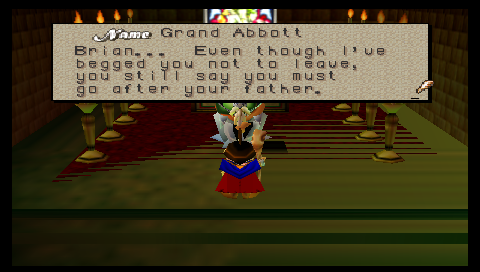
This renders at 480x272. Notice how the vertial lines for the 't' and 'f' characters look slightly too heavy. This is as a result of scaling the graphics up to fit the PSP's screen. (As an aside, this screenshot clearly shows another issue that I need to address - the zfighting which is clearly visible in the carpet. I have a couple of ideas for fixing this.)
The next shot shows the same scene with the new unscaled 4:3 viewport setting:
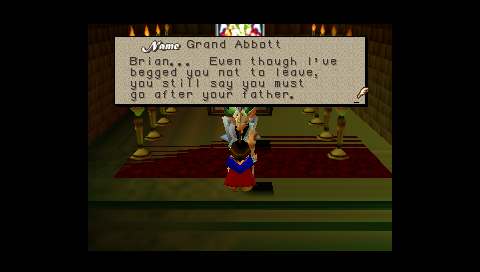
This renders at 320x240, and so avoids scaling up any of the graphics. You can see that the problems with the 'f' and 't characters has gone. On the downside, there's a lot of 'wasted' space around the screen.
The final settings shows the new scaled 4:3 viewport setting:

This maintains a 4:3 ratio (so we maintain the correct aspect ratio), but scales things up to 362x272 to make full use of the screen's height. We waste a little less space with this mode, but some of the original problems with the text are still visible.
In the end all three options are a trade off between making full use of the screen and quality. In the next release it will be possible to adjust this setting as the emulator is running so you can pick whichever one looks best for the rom you're currently running.
As a result of doing this work with the viewport, I also fixed a couple of bugs related to how I was emulating the N64's viewport. When I originally wrote the graphics code for the PSP version of Daedalus, I forgot to handle the N64's viewport scaling/translation, which causes problems rendering certain scenes, as demonstrated in Aerogauge below:
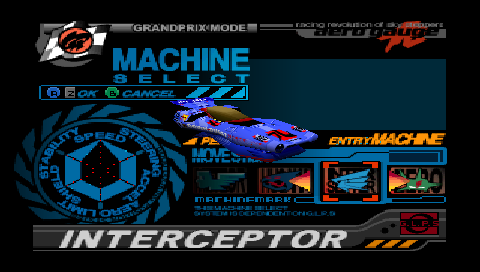
Notice how the car is being rendered off-centre (it should be in the top right hand corner). After my viewport fixes, the same scene now looks like this:

The same change also fixes various minor glitches in a number of other roms (including Mariokart and Waverace), so it's a nice bugfix to get in for the next release.
-StrmnNrmn
Wednesday, August 30, 2006
Display List Debugger
I've been working on a few new features which I'm eager to talk about, but I thought it would be interesting to give some details about some of the tools I use to help me debug various problems with the emulator.
Some of the hardest problems to identify and fix are various graphical issues that crop up when running certain roms. Sometimes it's unhandled combiner modes (this is what results in the purple-and-black textures seen in so many screenshots). Other times there are black or white polygons, or scrambled textures and so on. Sometimes the screen is just totally black :)
When I'm trying to figure out what's causing a particular problem my first step is to recompile Daedalus with the Display List Debugger enabled. If you've been playing with the source, this is done by setting
The debugger is accessed by pausing emulation and hitting the right trigger button. You need to have PSPLink set up in order to use it, as I didn't want to clutter up the display with various debbuging output. When the debugger is activated, it keeps the emulator paused and replays the current display list over and over. The first thing is does is dump out a list of all the commands in the display list to a logfile which looks something like this (I've edited it somewhat to create a simple example):
What this is showing is a matrix being loaded (command 0066), texturing being enabled (0067), a bunch of vertices being loaded (0068) and then a triangle being rendered (0069). (That's quite a lot of work to display a single trinangle! In reality the n64 would load up batches of vertices and render multiple triangles at a time.)
The display list debugger also provides a number of other useful features. The first is the Combiner Explorer. This is how it looks in PSPLink:
This displays all the different combiners used in a scene, and allows them to be enabled or disabled individually. When they're disabled, it replaces the triangle with a big green and black texture, like so:


In each of these cases a single combiner was disabled, showing how different combiners are used to achieve different effects in the scene.
This tool is invaluable in debugging combiners as I add them, to ensure that they're doing what I think they're doing.
The Texture Explorer displays all the textures used in the scene. It looks like this in PSPLink:

It allows individual textures to be displayed on the PSP so I can ensure that they're being decoded correctly:

The final function I want to demonstrate is the ability to terminate the display list at a given point. That is, if a display list has 1000 commands, I can stop it after at any point during rendering to see what the scene looks like. The example pasted above shows a snippet of 4 commands from 66-69, typically there may be 3000-5000 commands in a display list - the Mario scene above is composed of 3614 commands.
Being able to stop the display list like this is really useful, because it allows me to see the exact command at which a given triangle in the scene is drawn. Let's say that we're trying to figure out why the triangles making up Mario's feet are coming out in the wrong colour. What we'd do is render the display list command by command until the specific triangle we were interested in appeared on-screen. At this point we'd be able to determine the command number, and cross-reference this with the display list log which was dumped at the beginning. Usually looking a few lines before this point in the log will reveal the source of the problem.
I hope this has provided a little insight into how I go about debugging some of Daedalus' graphical problems. I'll leave you with a sequence of shots showing how Mario 64 looks as it's rendered from start to finish:



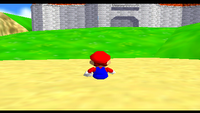


-StrmnNrmn
Some of the hardest problems to identify and fix are various graphical issues that crop up when running certain roms. Sometimes it's unhandled combiner modes (this is what results in the purple-and-black textures seen in so many screenshots). Other times there are black or white polygons, or scrambled textures and so on. Sometimes the screen is just totally black :)
When I'm trying to figure out what's causing a particular problem my first step is to recompile Daedalus with the Display List Debugger enabled. If you've been playing with the source, this is done by setting
CFLAGS = $(DEBUG_DLIST_CFLAGS) in the Makefile, and linking in Source/PSPGraphics/DisplayListDebugger.o.The debugger is accessed by pausing emulation and hitting the right trigger button. You need to have PSPLink set up in order to use it, as I didn't want to clutter up the display with various debbuging output. When the debugger is activated, it keeps the emulator paused and replays the current display list over and over. The first thing is does is dump out a list of all the commands in the display list to a logfile which looks something like this (I've edited it somewhat to create a simple example):
[00066] 0x00214290: 01060040 802143b0 G_GBI1_MTX
    Command: ModelView Load Push Length 64 Address 0x002143b0
     +1.00000     +0.00000     +0.00000     +0.00000
     +0.00000     +1.00000     +0.00000     +0.00000
     +0.00000     +0.00000     +1.00000     +0.00000
     +0.00000   +160.00000     +0.00000     +1.00000

[00067] 0x001c1118: bb000001 ffffffff G_GBI1_TEXTURE
    Level: 0 Tile: 0 enabled
    ScaleS: 0.999985, ScaleT: 0.999985
[00068] 0x001c1120: 04f00100 0a000000 G_GBI0_VTX
    Address 0x001c1000, v0: 0, Num: 16, Length: 0x0100
 #00 Flags: 0x0000 Pos: { 0.000000, 60.000000,-1.000000}
 #01 Flags: 0x0000 Pos: { 80.000000, 60.000000,-1.000000}
 #02 Flags: 0x0000 Pos: { 80.000000, 80.000000,-1.000000}
[00069] 0x001c1130: bf000000 00000a14 G_GBI1_TRI1
   Tri: 0,1,2
What this is showing is a matrix being loaded (command 0066), texturing being enabled (0067), a bunch of vertices being loaded (0068) and then a triangle being rendered (0069). (That's quite a lot of work to display a single trinangle! In reality the n64 would load up batches of vertices and render multiple triangles at a time.)
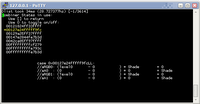
The display list debugger also provides a number of other useful features. The first is the Combiner Explorer. This is how it looks in PSPLink:

This displays all the different combiners used in a scene, and allows them to be enabled or disabled individually. When they're disabled, it replaces the triangle with a big green and black texture, like so:


In each of these cases a single combiner was disabled, showing how different combiners are used to achieve different effects in the scene.
This tool is invaluable in debugging combiners as I add them, to ensure that they're doing what I think they're doing.
The Texture Explorer displays all the textures used in the scene. It looks like this in PSPLink:

It allows individual textures to be displayed on the PSP so I can ensure that they're being decoded correctly:

The final function I want to demonstrate is the ability to terminate the display list at a given point. That is, if a display list has 1000 commands, I can stop it after at any point during rendering to see what the scene looks like. The example pasted above shows a snippet of 4 commands from 66-69, typically there may be 3000-5000 commands in a display list - the Mario scene above is composed of 3614 commands.
Being able to stop the display list like this is really useful, because it allows me to see the exact command at which a given triangle in the scene is drawn. Let's say that we're trying to figure out why the triangles making up Mario's feet are coming out in the wrong colour. What we'd do is render the display list command by command until the specific triangle we were interested in appeared on-screen. At this point we'd be able to determine the command number, and cross-reference this with the display list log which was dumped at the beginning. Usually looking a few lines before this point in the log will reveal the source of the problem.
I hope this has provided a little insight into how I go about debugging some of Daedalus' graphical problems. I'll leave you with a sequence of shots showing how Mario 64 looks as it's rendered from start to finish:


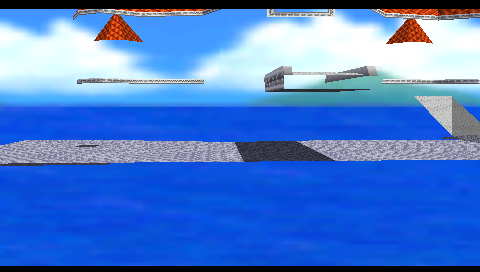

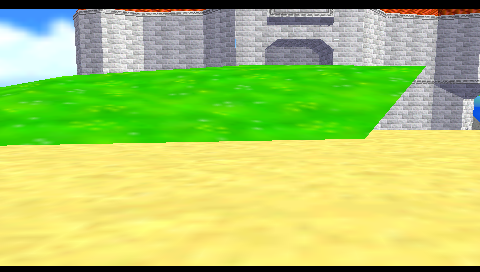
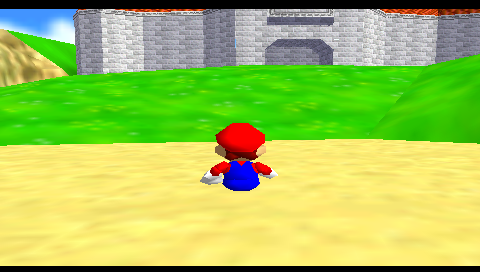

-StrmnNrmn
Friday, August 25, 2006
Something for the weekend - R8
I got back from my trip yesterday and I've spent a few hours today putting together the final changes for Daedalus PSP R8.
You can grab the latest files from SourceForge.
Here's the changelist:
It should be pretty obvious that most of the changes in R8 are optimisations. This build is significantly faster than R7, which is a significant achievement considering how much R7 had achieved in this area. Here's an updated view of the framerate table I introduced a couple of months ago and updated recently:
I think the numbers speak for themselves. What's particularly impressive is that the R8 results are so high, despite having the new clipping code enabled by default. By implementing the triangle clipping code and the transform and lighting code using the PSP's VFPU I've managed to keep the additional cost to a minimum.
With the previous release, I also mentioned a list of things I had planned for R8. I decided to put them on hold while I pursued the various optimisations in R8, so I'll be looking at working on them for the next release.
Have fun - I'm going to wade through the past couple of weeks worth of emails that have built up while I've been putting this build together :)

-StrmnNrmn
You can grab the latest files from SourceForge.
Here's the changelist:
[^] Replaced all uses of sceCtrlReadBufferPositive with sceCtrlPeekBufferPositive.
[^] Various known value optimisations for the dynamic recompilation engine.
[^] Various texture cache optimisations and rendering optimisations.
[+] Implemented a new clipping method which is more efficient and gives better results.
[-] Removed 'tesselate large triangles' setting.
[+] Added option to reset emulator to the main menu.
[^] No longer use index buffers for rendering.
[^] Implement matrix multiplication using VFPU.
[^] Implement vertex transform and lighting code using VFPU.
[^] Implement clipping code using VFPU.
[^] Minor AddTri optimisations.
[^] Free background and font textures while emulator is running to free VRAM.
[!] Fixed bug in default controller config (c-down and dpad-down were broken)
It should be pretty obvious that most of the changes in R8 are optimisations. This build is significantly faster than R7, which is a significant achievement considering how much R7 had achieved in this area. Here's an updated view of the framerate table I introduced a couple of months ago and updated recently:
| Scene | R4 fps | R5 fps | R7-beta fps | R8 fps |
| Mario Head | 3 | 6 | 8 | 8 |
| Mario Main Menu | 14 | 25 | 30 | 38 |
| Mario Peach Letter | 6-7 | 11 | 13 | 18 |
| Mario Flyby (under bridge) | 6 | 10 | 12 | 17 |
| Mario In Game | 5-6 | 9 | 11 | 15 |
| Mario Kart Nintendo logo | 10 | 23 | 24 | 35 |
| Mario Kart Flag | 6 | 11 | 13 | 16 |
| Mario Kart Menu | 7 | 11 | 13 | 14 |
| Zelda Nintendo Logo | 20 | 23 | ? | 70 |
| Zelda Start Menu | 2-3 | 4 | ? | 8 |
| Zelda Main Menu | 10 | 13 | ? | 40 |
I think the numbers speak for themselves. What's particularly impressive is that the R8 results are so high, despite having the new clipping code enabled by default. By implementing the triangle clipping code and the transform and lighting code using the PSP's VFPU I've managed to keep the additional cost to a minimum.
With the previous release, I also mentioned a list of things I had planned for R8. I decided to put them on hold while I pursued the various optimisations in R8, so I'll be looking at working on them for the next release.
Have fun - I'm going to wade through the past couple of weeks worth of emails that have built up while I've been putting this build together :)
-StrmnNrmn
Tuesday, August 22, 2006
Away for a couple of days
I've made some great progress on getting the new clipping code working with the PSP's VFPU. Actually, so far I've just been working on getting various matrix/vector routines and the transform and lighting (TnL) code working with the VFPU and I'm seeing very good results so far. The TnL code is around 2-3 times as fast running through the VFPU compared to the CPU. This gives around a 0.5-1.0fps speedup in the various roms I've been testing.
Unfortunately I have to put the clipping work on hold until the end of the week as I'm heading home for a few days to see my family. In the meantime, I've answered a few of your comments about clipping on the previous post.
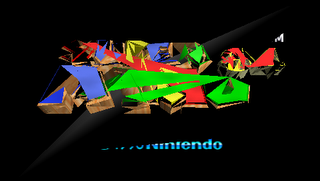
Also, here are a few amusing 'outtakes' as I was trying to get the VFPU TnL code working:

-StrmnNrmn
Unfortunately I have to put the clipping work on hold until the end of the week as I'm heading home for a few days to see my family. In the meantime, I've answered a few of your comments about clipping on the previous post.
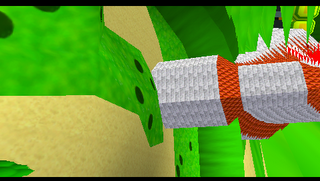
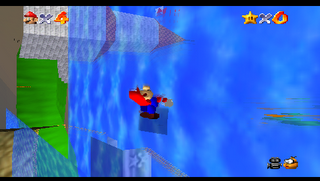
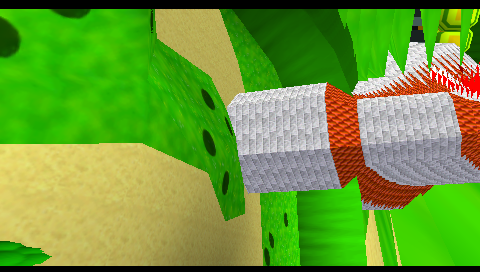
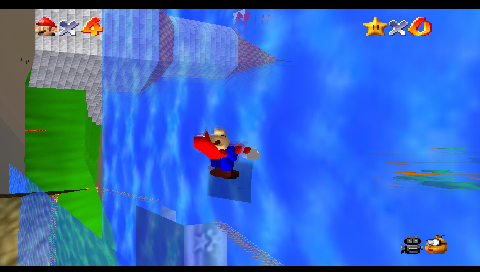
Also, here are a few amusing 'outtakes' as I was trying to get the VFPU TnL code working:

Hmm, something wrong with the indexing I think
Something is definitely wrong with the transform matrix (or else Lakitu is drunk :)
M.C. Escher would be proud


Whoops.
-StrmnNrmn
Sunday, August 20, 2006
Triangle Clipping
After Wednesday's news I wanted to keep everyone up to date with what I've been working on over the past few days.
With Wednesday's changes incorporated, I reprofiled a few roms to see where most of the CPU time was going. Things have changed considerably since I initially talked about deciding what to optimise. Looking at the profiler for Mario 64 the time spent executing display lists is now a much more significant fraction of the total time spent on each frame. Back around R3/R4 only around 20% of the time was spent here. With the latest build display list processing now accounts for around 35-40% of the time. The display list processing hasn't become any slower, it's just becoming more significant as I've optimised the CPU emulation.
One of the settings I mentioned was worth disabling for a speed boost when I released R7 was the 'Tesselate Large Triangles' option. When this setting is enabled, it causes the display list processor to recursively break up large triangles into smaller pieces. This has been necessary to overcome the PSPs poor hardware clipping support; without breaking the triangles up into smaller pieces, the PSP will often fail to render large triangles as shown below:
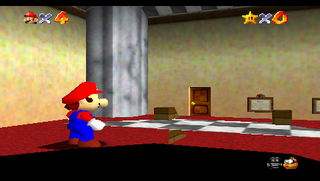
The large triangles that make up the floor that Mario is standing on are rejected by the PSP, leaving a large hole where the floor should be. By breaking the triangles into smaller pieces before attempting to render them, it reduces the chance that the PSP will decide to discard them.
There were a few problems with the 'Tesselate Large Triangles' setting which I've been working on overcoming this weekend. Firstly, it's not perfect - there were plenty of cases where visible triangles would still be culled even when they had been subdivided 3-4 times (which generates 27-81 triangles for each input triangle!). This was always quite noticable in games with a relatively low camera, such as racing games. The other big problem with this setting was that it was very slow - often adding over 20ms per frame.
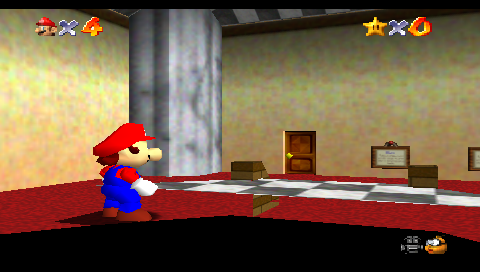
This setting was always intended as a quick fix rather than a long term solution, so I've been looking at fixing both of these problems over the past few days. I started by ripping out all the exisiting polygon clipping and tesselation code and starting from scratch. After a couple of days of hacking I've finally got a replacement system that seems to be clipping everything I've thrown at it perfectly. Here's a shot of the same location in Mario 64:
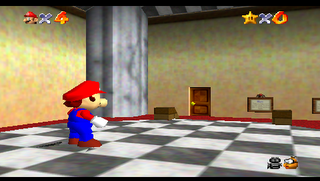
Now that I have a working version of the code in place, I'm going to look at optimising it. At the moment the new clipping code is roughly as expensive as the tesselation code, but due to the way it's implemented I think it should be much easier to make work with the PSP's VFPU, as I can process batches of vertices in parallel. Ideally I'd like to get this change into the next release, so I'm going to hold off putting the R8 build together until it's ready. I'll let you know how I get on.
-StrmnNrmn
With Wednesday's changes incorporated, I reprofiled a few roms to see where most of the CPU time was going. Things have changed considerably since I initially talked about deciding what to optimise. Looking at the profiler for Mario 64 the time spent executing display lists is now a much more significant fraction of the total time spent on each frame. Back around R3/R4 only around 20% of the time was spent here. With the latest build display list processing now accounts for around 35-40% of the time. The display list processing hasn't become any slower, it's just becoming more significant as I've optimised the CPU emulation.
One of the settings I mentioned was worth disabling for a speed boost when I released R7 was the 'Tesselate Large Triangles' option. When this setting is enabled, it causes the display list processor to recursively break up large triangles into smaller pieces. This has been necessary to overcome the PSPs poor hardware clipping support; without breaking the triangles up into smaller pieces, the PSP will often fail to render large triangles as shown below:
Super Mario 64 without clipping
The large triangles that make up the floor that Mario is standing on are rejected by the PSP, leaving a large hole where the floor should be. By breaking the triangles into smaller pieces before attempting to render them, it reduces the chance that the PSP will decide to discard them.
There were a few problems with the 'Tesselate Large Triangles' setting which I've been working on overcoming this weekend. Firstly, it's not perfect - there were plenty of cases where visible triangles would still be culled even when they had been subdivided 3-4 times (which generates 27-81 triangles for each input triangle!). This was always quite noticable in games with a relatively low camera, such as racing games. The other big problem with this setting was that it was very slow - often adding over 20ms per frame.
This setting was always intended as a quick fix rather than a long term solution, so I've been looking at fixing both of these problems over the past few days. I started by ripping out all the exisiting polygon clipping and tesselation code and starting from scratch. After a couple of days of hacking I've finally got a replacement system that seems to be clipping everything I've thrown at it perfectly. Here's a shot of the same location in Mario 64:

Super Mario 64 with new clipping code
Now that I have a working version of the code in place, I'm going to look at optimising it. At the moment the new clipping code is roughly as expensive as the tesselation code, but due to the way it's implemented I think it should be much easier to make work with the PSP's VFPU, as I can process batches of vertices in parallel. Ideally I'd like to get this change into the next release, so I'm going to hold off putting the R8 build together until it's ready. I'll let you know how I get on.
-StrmnNrmn
Wednesday, August 16, 2006
Unexpected optmisations
One of the things that I find most rewarding about programming is when you discover an unexpected improvement or optimisation by accident. You can spend weeks carefully tuning and optimising code, only to stumble across a glaring inefficiency in your code which you've never spotted before. One quick change and your application is suddenly noticably faster.
In my daily job I rely heavily on debuggers and profilers to discover bottlenecks in the working on the Xbox, Microsoft provided some excellent performance analysis tools (I see they've finally released PIX for Windows). These days I tend to use AQtime as I'm PC based (it's also one of the few profilers I've found that can handle the size of our libraries at work without grinding to a shuddering halt.)
Without these kind of tools it's a lot tougher profiling on the PSP. Over the past few months I've built a number of custom profiling tools into Daedalus to help me figure out where all the time is going, but the numbers I get out tend to be quite vague, and there's usually quite a large margin of error. I think this explains why the unexpected optimisation I've just found went undiscovered for so long.
A couple of days ago I was browsing the ps2dev forums and came across this post. I was about to back out after a quick scan, when I noticed this comment from Soatome:
That's when I realised that when Daedalus was emulating a rom, it was stalling for a frame every time the rom read the status of the pad*. In other words by changing one line of code in Daedalus from
to
I could get on average an instant 1fps speedup across all roms. What's more, I knew some roms read from the pad multiple times each frame, so they would see an even great speedup.
Frustratingly I had to wait a couple of days before I could try this out. As I mentioned earlier I'm in the process up moving over to a new PC, and I had just moved Perforce over but hadn't set up the pspsdk, which required Cygwin. Daedalus requires libpng and zlib so I had to download and build them too. Then I had to set up Psplink, PuTTY and a whole host of other tools. You get the picture...
Last night I finally managed to get a new build together with the updated code, and the results were every bit as good as I'd expected. In some cases I had to restart the rom just to make sure I wasn't mistaken. I know most of you just want to see some numbers, so here's a few of my observations:
Mario now runs at at steady 15fps in most places, and around 20fps indoors etc (it reaches over 35fps in the main menu, and close to 30 in some scenes.) Zelda now runs at around 8fps in game, and up to 20fps in certain places. The 'nintendo' logo at the start runs at over 90fps :D The MarioKart Nintendo logo now runs at 30fps, and the main menu (with the flag) runs at a solid 15fps. In game it's a comfortable 12fps. Starfox runs at around 15fps - the intro runs at 25-30fps. Quest64 runs at 20fps.
So all in all it's a pretty amazing improvement for a single-line change. Having said that, I think it would be a mistake to assume that this is an instant fix that will suddenly make everything fully-playable. Although some of the framerates I list above are excellent - faster than an native n64 even - not all roms show this improvement. Don't assume that all roms now run at 15+fps (because they don't.) There's still a lot more work to do to get from a sluggish 8fps to a more playable 15fps (in Zelda for instance). I still need to save a lot more cycles in order to support other features such as sound.
Because this change makes such a big improvement I'm going to try and get another release out sooner rather than later. I don't like releasing builds too often as I think each revision should something worthwhile, but I think this qualifies :) There are a couple of other optimisations I want to get in this build, so while it might be ready this weekend, sometime early next week is more likely. The new features I had planned for this build will have to wait until R9.
As always, I'll keep you posted.
-StrmnNrmn
*This actually reminds me of a funny story from one of the Xbox games I was working on. We were investigating a sudden slowdown that had been appeared a few days previously. Somehow I realised that the framerate doubled when you unplugged all the controllers. As it turned out someone was accidentally reinitialising the USB hub every frame, and removing the all controllers prevented this from happening.
In my daily job I rely heavily on debuggers and profilers to discover bottlenecks in the working on the Xbox, Microsoft provided some excellent performance analysis tools (I see they've finally released PIX for Windows). These days I tend to use AQtime as I'm PC based (it's also one of the few profilers I've found that can handle the size of our libraries at work without grinding to a shuddering halt.)
Without these kind of tools it's a lot tougher profiling on the PSP. Over the past few months I've built a number of custom profiling tools into Daedalus to help me figure out where all the time is going, but the numbers I get out tend to be quite vague, and there's usually quite a large margin of error. I think this explains why the unexpected optimisation I've just found went undiscovered for so long.
A couple of days ago I was browsing the ps2dev forums and came across this post. I was about to back out after a quick scan, when I noticed this comment from Soatome:
PeterM wrote:
but one waits for the vblank
...and that's sceCtrlReadBufferPositive (which you're using)
you should use sceCtrlPeekBufferPositive instead.
That's when I realised that when Daedalus was emulating a rom, it was stalling for a frame every time the rom read the status of the pad*. In other words by changing one line of code in Daedalus from
sceCtrlReadBufferPositive
to
sceCtrlPeekBufferPositive
I could get on average an instant 1fps speedup across all roms. What's more, I knew some roms read from the pad multiple times each frame, so they would see an even great speedup.
Frustratingly I had to wait a couple of days before I could try this out. As I mentioned earlier I'm in the process up moving over to a new PC, and I had just moved Perforce over but hadn't set up the pspsdk, which required Cygwin. Daedalus requires libpng and zlib so I had to download and build them too. Then I had to set up Psplink, PuTTY and a whole host of other tools. You get the picture...
Last night I finally managed to get a new build together with the updated code, and the results were every bit as good as I'd expected. In some cases I had to restart the rom just to make sure I wasn't mistaken. I know most of you just want to see some numbers, so here's a few of my observations:
Mario now runs at at steady 15fps in most places, and around 20fps indoors etc (it reaches over 35fps in the main menu, and close to 30 in some scenes.) Zelda now runs at around 8fps in game, and up to 20fps in certain places. The 'nintendo' logo at the start runs at over 90fps :D The MarioKart Nintendo logo now runs at 30fps, and the main menu (with the flag) runs at a solid 15fps. In game it's a comfortable 12fps. Starfox runs at around 15fps - the intro runs at 25-30fps. Quest64 runs at 20fps.
So all in all it's a pretty amazing improvement for a single-line change. Having said that, I think it would be a mistake to assume that this is an instant fix that will suddenly make everything fully-playable. Although some of the framerates I list above are excellent - faster than an native n64 even - not all roms show this improvement. Don't assume that all roms now run at 15+fps (because they don't.) There's still a lot more work to do to get from a sluggish 8fps to a more playable 15fps (in Zelda for instance). I still need to save a lot more cycles in order to support other features such as sound.
Because this change makes such a big improvement I'm going to try and get another release out sooner rather than later. I don't like releasing builds too often as I think each revision should something worthwhile, but I think this qualifies :) There are a couple of other optimisations I want to get in this build, so while it might be ready this weekend, sometime early next week is more likely. The new features I had planned for this build will have to wait until R9.
As always, I'll keep you posted.
-StrmnNrmn
*This actually reminds me of a funny story from one of the Xbox games I was working on. We were investigating a sudden slowdown that had been appeared a few days previously. Somehow I realised that the framerate doubled when you unplugged all the controllers. As it turned out someone was accidentally reinitialising the USB hub every frame, and removing the all controllers prevented this from happening.
Sunday, August 13, 2006
R7 released!
I've just uploaded R7 to SourceForge. Here's the changelist:
Daedalus R7 for v1.00
Daedalus R7 for v1.50
Daedalus R7 Source
The main emphasis has been on improving the framerate of as many roms as possible, but I've also made some significant fixes to the dynarec engine which should improve compatibility for a few roms where this was causing problems before.
There are two settings you should be aware of if you're looking at getting the fastest possible framerate. The first is on the global settings page (that's the one you see on the main menu as soon as you boot up). You'll want to set 'Tesselate Large Triangles' to No here. The next option that helps boost the framerate is set 'Texture Update Check' to Disabled on the Rom Settings screen. A combination of these two options give a significant speedup in various roms.
In R7 I've also added the ability to define your own custom controller configurations. You can define a new controller mapping by adding a new .ini file to the Daedalus/ControllerConfigs directory. There are a few examples in there already, and I'll look at posting a brief tutorial up here sometime soon. If you come up with a new mapping you think would be useful then email me (my address is in the readme.txt) and I'll post it up here and add it to a later release.
I think R8 is going to continue to focus on improving the framerate. I still have a lot of optimisations I want to get in, and I think these will help improve the framerate even further. I also want to spend a little time improving the front end, as it's getting harder for me to add new settings and options in there. I also want to add an option for changing some of the settings while a rom is running (i.e. I think it's time we had an in-game menu.) Another thing I'll look at for R8 is saving settings between runs of the emulator - this way Daedalus will remember which controller setup you prefer for each rom. Finally I want to add an option to quit back to the main menu without having to restart Daedalus.
Phew! That's quite a big list. I can't guarantee I'll be able to add all that for the next release, but that's what I'm currently aiming for. I think it's more important to try and release regularly (i.e. every 3-4 weeks) rather than try and cram everything into one go, so some of these features might move back to R9 if I slip behind.
My first job though is to move my development environment over from my old PC to the new 'beast'. I've had to put this release together through a Remote Desktop Connection to the old PC and I can't bear to do that any longer. It'll probably take a few days to get everything set up on the new PC, but it should be a lot less painful in the long run :)
-StrmnNrmn
[^] Avoid checking for interrupts in dynarec code in most situations.
[^] Optimise dynarec Load/Store instructions to avoid checking for interrupts directly.
[^] Implemented the remaining 32-bit integer instructions in the dynarec.
[^] Implemented the remaining commong load/store instructions in the dynarec.
[^] Implemented JAL/JR in dynarec.
[^] Optimised various texture cache related features.
[^] Added various known value optimisations to the dynarec engine.
[^] Link together blocks even when they exit with branch likely instructions.
[+] Added option to allow frequency of texture update checks to be reduced.
[+] Added the ability to configure buttons
[!] Fixed a couple of compatibility issues caused by the dynarec.
[!] Fixed a couple of issues related to self-modifying code and the dynarec.
[!] Fixed issues with the framerate counter flickering.
Daedalus R7 for v1.00
Daedalus R7 for v1.50
Daedalus R7 Source
The main emphasis has been on improving the framerate of as many roms as possible, but I've also made some significant fixes to the dynarec engine which should improve compatibility for a few roms where this was causing problems before.
There are two settings you should be aware of if you're looking at getting the fastest possible framerate. The first is on the global settings page (that's the one you see on the main menu as soon as you boot up). You'll want to set 'Tesselate Large Triangles' to No here. The next option that helps boost the framerate is set 'Texture Update Check' to Disabled on the Rom Settings screen. A combination of these two options give a significant speedup in various roms.
In R7 I've also added the ability to define your own custom controller configurations. You can define a new controller mapping by adding a new .ini file to the Daedalus/ControllerConfigs directory. There are a few examples in there already, and I'll look at posting a brief tutorial up here sometime soon. If you come up with a new mapping you think would be useful then email me (my address is in the readme.txt) and I'll post it up here and add it to a later release.
I think R8 is going to continue to focus on improving the framerate. I still have a lot of optimisations I want to get in, and I think these will help improve the framerate even further. I also want to spend a little time improving the front end, as it's getting harder for me to add new settings and options in there. I also want to add an option for changing some of the settings while a rom is running (i.e. I think it's time we had an in-game menu.) Another thing I'll look at for R8 is saving settings between runs of the emulator - this way Daedalus will remember which controller setup you prefer for each rom. Finally I want to add an option to quit back to the main menu without having to restart Daedalus.
Phew! That's quite a big list. I can't guarantee I'll be able to add all that for the next release, but that's what I'm currently aiming for. I think it's more important to try and release regularly (i.e. every 3-4 weeks) rather than try and cram everything into one go, so some of these features might move back to R9 if I slip behind.
My first job though is to move my development environment over from my old PC to the new 'beast'. I've had to put this release together through a Remote Desktop Connection to the old PC and I can't bear to do that any longer. It'll probably take a few days to get everything set up on the new PC, but it should be a lot less painful in the long run :)
-StrmnNrmn
Subscribe to:
Posts (Atom)